



Great News From Youtubers, We've got new Tools For Convert FLV Video From Youtube, Dailymotion, Metacafe, and many more with Free Video to Mp3 Converter 2.7 yes it's completely free :
First of all you need to download the video from youtube (if you wondering how to download a video from youtube just follow this link :
http://helpmyinternet.blogspot.com/2007/07/how-to-download-video-from-youtube.html
then you need to download Free Video to Mp3 Converter 2.7 try to click this link :
http://www.dvdvideosoft.com/download/FreeVideoToMp3Converter.exe
ps: it's completely free download, free virus, spyware or adware.
Then Try to install it (after you've installed successfully then will show this picture) :
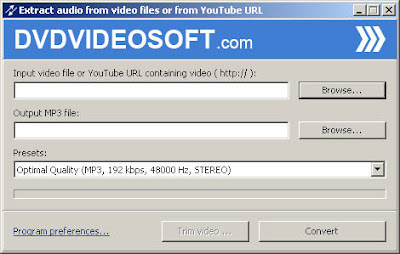
Click on the Browse Button in Input video file text box :
ps you can either search flv video on your computer or copy the youtube url such as (http://youtube.com/watch?v=y-TYin_PTRE) on the input box.
Then Click on the Second Browse Button in Output Mp3 to put your converted mp3 file, or you can leave the default location with the original file video.
You can set the quality of the mp3 such as :
 I recommend you to choose the standard quality of the MP3 (192 Kbps) then click the convert button :

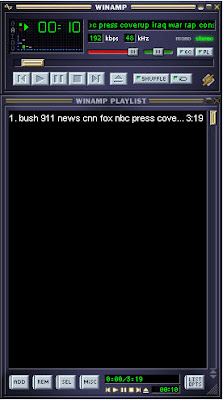
And Your Mp3 it's ready to be listen :
Read more
First of all you need to download the video from youtube (if you wondering how to download a video from youtube just follow this link :
http://helpmyinternet.blogspot.com/2007/07/how-to-download-video-from-youtube.html
then you need to download Free Video to Mp3 Converter 2.7 try to click this link :
http://www.dvdvideosoft.com/download/FreeVideoToMp3Converter.exe
ps: it's completely free download, free virus, spyware or adware.
Then Try to install it (after you've installed successfully then will show this picture) :

Click on the Browse Button in Input video file text box :
ps you can either search flv video on your computer or copy the youtube url such as (http://youtube.com/watch?v=y-TYin_PTRE) on the input box.
Then Click on the Second Browse Button in Output Mp3 to put your converted mp3 file, or you can leave the default location with the original file video.
You can set the quality of the mp3 such as :
 I recommend you to choose the standard quality of the MP3 (192 Kbps) then click the convert button :

And Your Mp3 it's ready to be listen :







 Posts

