



After you've successfully created Free .CO.CC Domain, you need to set up your DNS Configuration to make it works, see these steps to set .CO.CC DNS :
First (after you've login) Click Domain Settings Menu :
 Choose your domain, to set it's DNS :

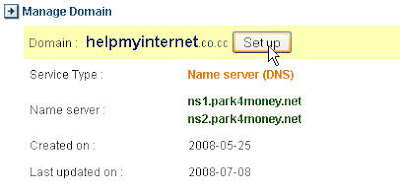 It Will Display these page and Click Set up Button bellow :
Input your DNS Server Name / Ip bellow :
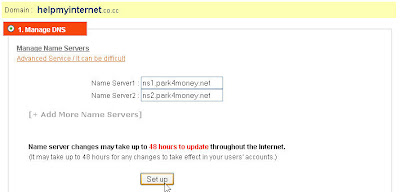
Wait For 2 Days to make it works (approximately48 Hours) and see the result.
Read more
First (after you've login) Click Domain Settings Menu :
 Choose your domain, to set it's DNS :
 It Will Display these page and Click Set up Button bellow :Input your DNS Server Name / Ip bellow :
Wait For 2 Days to make it works (approximately48 Hours) and see the result.






 Posts
Posts

